HubSpot Social Media Tools Start at $800 a Month (A Free Alternative)
HubSpot social media tools start at Marketing Hub Professional, $800 a month. Keep the CRM, schedule in a free tool and keep attribution with UTM tags.

HubSpot social media tools start at $800 a month. The Free CRM and the Starter tier include no social publishing at all; it arrives with Marketing Hub Professional, listed at $800 a month on annual commitment, plus a one-time $3,000 onboarding fee. If you already pay for Professional because you need its automation, the social tool is effectively included and you should use it. On Free or Starter, with scheduling as your only need, there is a cheaper move: keep the CRM where it is, run scheduling in a separate free tool, and tag every link with UTM parameters so HubSpot still records where each contact came from.
What HubSpot social media management includes, and on which tier
HubSpot social media management is a Marketing Hub Professional feature, and no cheaper HubSpot tier includes it. HubSpot's own knowledge base lists Marketing Hub Professional and Enterprise as the subscriptions that can create and publish social posts. The pricing page showed Professional with three core seats, 50 connected social accounts and 10,000 posts a month. Starter, listed at $20 a seat, has no social publishing, and neither do the Free tools.
Our own content week runs 37 posts across 11 channels, which would use under 2% of that monthly allowance. With caps that high, the decision rests on the entry price.
When HubSpot's social media tool is the right choice
A business that already runs Marketing Hub Professional for its automation should schedule from inside HubSpot. The social tool comes with it at no extra charge. HubSpot describes the benefit as the ability to 'track engagement within your CRM', so posts and their engagement sit in the same system as your contacts.
A team running an employee-generated content programme across dozens of accounts also gets full use from the 50-account allowance. Moving scheduling out would save nothing. The arithmetic only changes when scheduling is the reason for the upgrade.
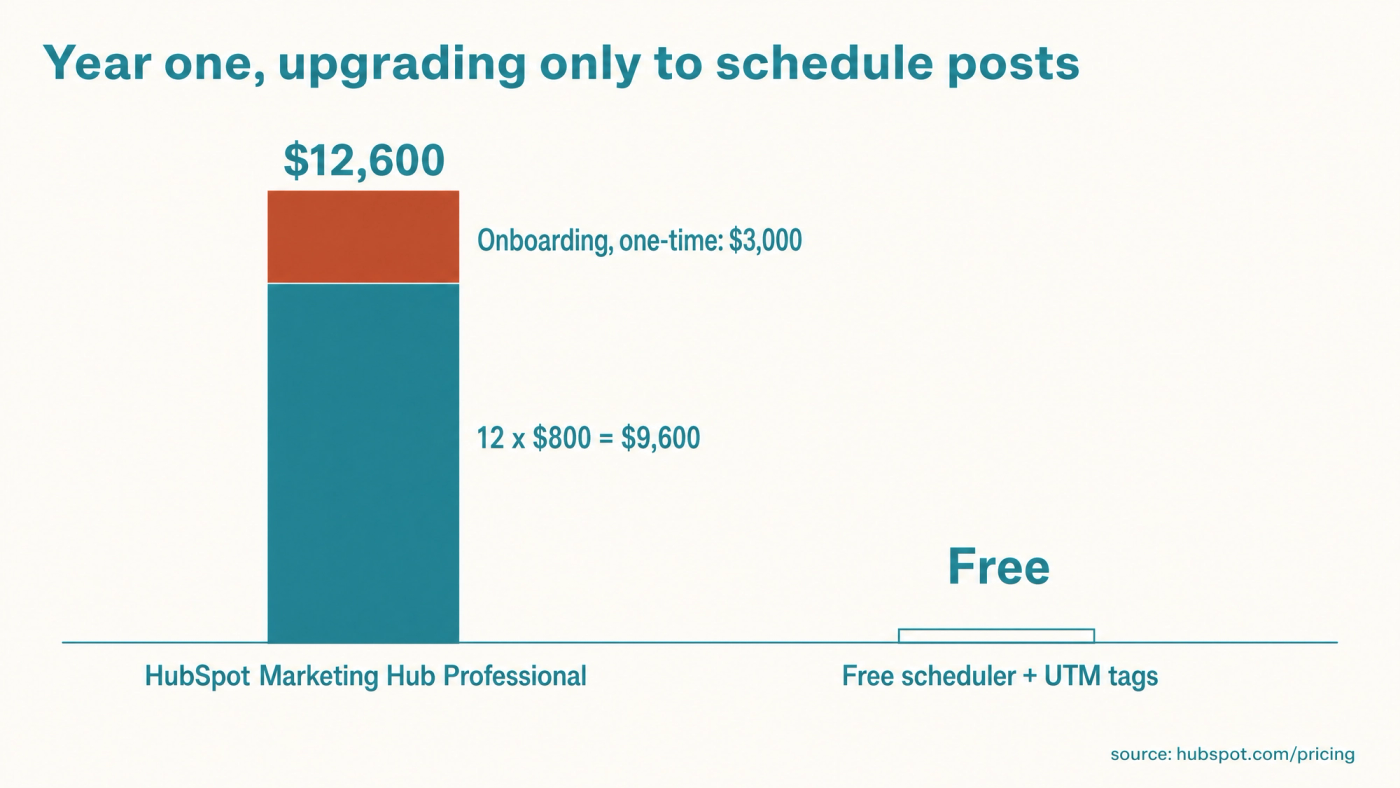
What upgrading HubSpot to schedule posts costs: $12,600 in year one
Upgrading from HubSpot Free or Starter to Professional in order to schedule posts costs $9,600 a year plus a $3,000 onboarding fee on the displayed price. The sum is short: 12 months at $800, then the one-time fee, for $12,600 in the first year. Set it beside what a content marketing agency costs before you sign, since both come from one budget.
Scheduling itself is close to free elsewhere. Meta Business Suite schedules Facebook, Instagram and Threads posts at no charge, Buffer's free plan covers three channels with 10 scheduled posts each, and Voholabs Studio, which is ours, is free with no cap on channels or posts. We compared 14 pricing pages in our guide to free social media schedulers, and the cheapest paid social media schedulers start at $5 per account a month. The usual objection to leaving HubSpot is attribution, and that has a fix.
How to keep HubSpot attribution with UTM parameters
UTM parameters are short labels added to the end of a link that tell analytics software where a click came from. HubSpot reads them on any page that carries its tracking code, and the tracking code is available on all products and plans, Free included. A tagged link follows this pattern:
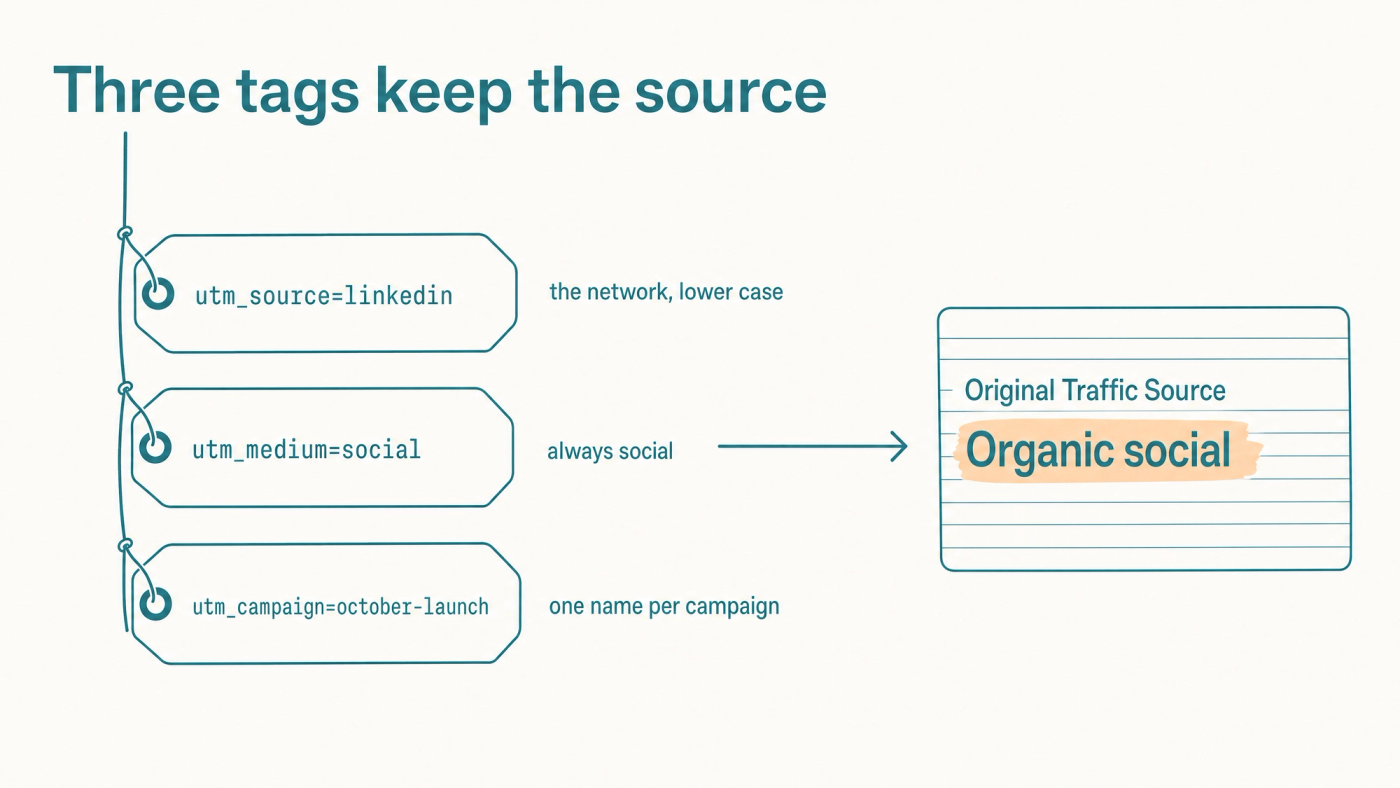
https://yoursite.com/pricing?utm_source=linkedin&utm_medium=social&utm_campaign=october-launch
HubSpot's documented rule is that a visit with utm_medium set to social and a recognised network in utm_source counts as Organic social. When that visitor later becomes a contact, the Original Traffic Source property records it, and its second drill-down field holds your campaign name. That property exists on every HubSpot plan. A different medium can send the visit to Other campaigns instead, so the exact word matters.
- Confirm the HubSpot tracking code is on every page you link to.
- Fix one convention: utm_source is the network in lower case, utm_medium is always social, and utm_campaign is one name per campaign.
- Tag every link before the post is scheduled, including links placed in first comments.
- Click one tagged link yourself, submit a form with a test address, and check that contact's Original Traffic Source.
Tagged links only help on pages you own, one more reason your own blog beats rented platforms for visibility. HubSpot's knowledge base lists the sources report in its traffic analytics tool under Professional and Enterprise, so on Free or Starter you read attribution on the contact record.
What you lose by separating scheduling from HubSpot
Separating the two tools means your posts and their engagement no longer sit inside the CRM next to your contacts. UTM tags capture clicks that reach your site, while likes, comments and replies stay on the networks. Reporting then lives in two places.
If your sales team relies on seeing social interactions inside HubSpot, that is a fair reason to pay for Professional. For a business that mainly needs to know which posts produce contacts, the tags answer it.
A free social media scheduler to run beside HubSpot
Voholabs Studio is a free hosted scheduler that runs beside HubSpot and replaces only the social publishing piece. The free plan has no cap on channels or scheduled posts across LinkedIn, X, Instagram, Facebook, Threads and TikTok. It includes a calendar, team members, 30 webhooks, a public API and an MCP connection, with a 2 GB limit on media storage.
MCP (Model Context Protocol) is the standard that lets an AI assistant such as ChatGPT, Copilot, Gemini or Claude operate an outside tool directly. If you are AI-enabled, meaning you draft posts in a chat window and paste them into each app, the next stage is AI-first: your assistant queues the week in the scheduler, applies your UTM convention to every link, and you approve the result. It is one of the AI workflows one person can run, and a low-risk first job for an AI agent in a small business.
The free plan leaves out all AI: writing, image and video generation, and the brief, the set of documents that teaches our agent your business, voice and boundaries. Those belong to Apex, our managed content agent. Sign-up asks for Google sign-in or a work email, then five short questions.
Keep the CRM where it is and move only the scheduling: start free at voholabs.com/studio.
What to do next
HubSpot's social tool is good value once Professional is already paying for itself through automation. Bought for scheduling alone, it is $12,600 in year one for a job free tools cover. In that case, set your UTM convention today and move publishing to a free scheduler such as Voholabs Studio; the same convention carries over when you run a blog alongside social media. Tag the links first.
References
- Marketing Hub pricing and feature comparison, HubSpot (2026)
- Create and publish social posts, HubSpot Knowledge Base (2026)
- Understand source properties, HubSpot Knowledge Base (2026)
- Understand HubSpot's traffic sources in the traffic analytics tool, HubSpot Knowledge Base (2026)
- Install the HubSpot tracking code, HubSpot Knowledge Base (2026)
- Buffer pricing, Buffer (2026)
- About Meta Business Suite, Meta Business Help Centre (2026)
- Publer plans, Publer (2026)
Frequently asked questions
- Does HubSpot's free CRM include social media scheduling?No. HubSpot's Free tools and Starter tier include no social publishing. Social media tools start at Marketing Hub Professional, listed at $800 a month on annual commitment plus a one-time $3,000 onboarding fee, with three core seats, 50 connected accounts and 10,000 posts a month.
- Will HubSpot still track leads from social media if I schedule posts in another tool?Yes, for clicks that reach your site. Tag each link with utm_source set to the network, utm_medium set to social and a campaign name. HubSpot's documented rules file that visit under Organic social, and the contact's Original Traffic Source property, available on all plans, records it. Likes and comments on the post stay outside the CRM.
- Is Marketing Hub Professional worth it for social media alone?Rarely. On the displayed price it costs $9,600 a year plus $3,000 onboarding, and free tools cover scheduling. It is good value when you already need Professional for its automation, because the social tool is then included and your posts sit in the same system as your contacts.
- Is Voholabs Studio a HubSpot alternative?Only for social media publishing. Studio is a free scheduler with unlimited channels and scheduled posts, an API and an MCP connection, and a 2 GB media cap. It has no CRM, email marketing or automation, so it runs beside HubSpot and your contacts stay where they are.
Sources
- Marketing Hub pricing and feature comparison· HubSpot
- Create and publish social posts· HubSpot
- Understand source properties· HubSpot
- Understand HubSpot's traffic sources in the traffic analytics tool· HubSpot
- Install the HubSpot tracking code· HubSpot
- Buffer pricing· Buffer
- About Meta Business Suite· Meta
- Publer plans· Publer