Postiz vs Buffer in 2026: Postiz Gets Cheaper at 7 Channels
Postiz vs Buffer on price, seats, networks and self-hosting: Buffer is cheaper below 7 channels for one user, Postiz from there, plus a free third option.


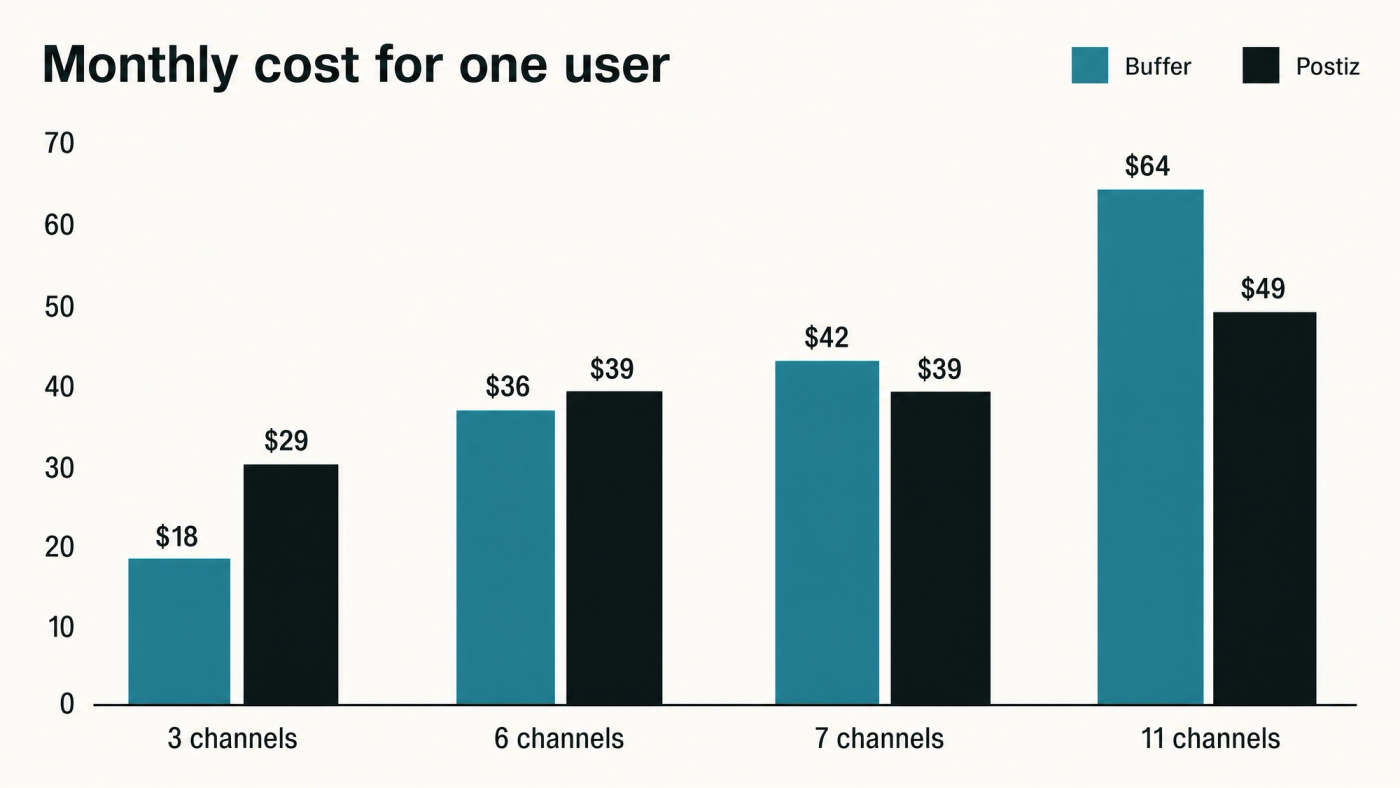
Seven channels is where Postiz becomes cheaper than Buffer for a solo operator. Below that Buffer mostly wins, with the two within $3 of each other at five and six channels, and a second login brings the flip down to four. That is the Postiz vs Buffer pricing answer, because Buffer charges $6 per channel per month and hosted Postiz a flat $29 to $49 for a block of channels.
Below, the two are also compared on seats, networks, limits, self-hosting and AI access, from each vendor's own pages, and Voholabs Studio, the free hosted scheduler we run, is measured on the same axes halfway through.
Postiz vs Buffer at a glance: how each one bills
Buffer bills per connected channel and Postiz bills per plan, which is why the cheaper tool changes as you add accounts. On monthly billing:
- Buffer Free costs $0 for 3 channels and 1 user, with 10 scheduled posts per channel and one API key with 3,000 requests a month.
- Buffer Essentials charges $6 per channel for channels 1 to 10 and $4 for 11 to 25, for 1 user and unlimited posts.
- Buffer Team charges $12 per channel for channels 1 to 10 and $4 for 11 to 25, with unlimited team members and approval workflows.
- Postiz Standard costs $29 a month for 5 channels and unlimited posts, with no team members.
- Postiz Team, Pro and Ultimate cost $39 for 10 channels, $49 for 30 and $99 for 100, each with unlimited team members and posts.
Buffer's paid plans come with a 14-day trial and its free plan has no end date. Postiz has no free hosted plan, only a 7-day trial. Its other price is $0: the code is open source under AGPL-3.0, a licence that lets anyone run the software on their own server.
Postiz vs Buffer pricing: where the two bills cross
The crossover point is the channel count at which a flat plan becomes cheaper than a per-channel one, and for a single user it sits at seven channels. At five channels the two are a dollar apart, $30 against $29. At six, Buffer costs $36 and Postiz $39, because six channels is one past Standard's limit and moves you up to Team.
At seven channels Buffer reaches $42 while Postiz stays at $39. At 11 channels Buffer Essentials comes to $64 and Postiz Pro to $49, a price Pro holds all the way to 30 channels.
A second login moves the crossover point down to four channels. A colleague moves Buffer to Team at $12 a channel, $36 for three channels and $48 for four, and moves Postiz to Team at $39 for up to ten. At 11 channels with a team, Buffer costs $124 and Postiz $49.
We have priced Buffer alone at 3, 5, 8 and 11 channels and nine schedulers at three business sizes; this head-to-head adds the point where these two swap places.
Networks, post limits and AI access in Postiz and Buffer
Both tools cover the six networks most businesses post to, LinkedIn, X, Instagram, Facebook, Threads and TikTok, and part ways on the long tail. Buffer lists 12 networks, including YouTube, Pinterest, Google Business Profile and Substack. Postiz says it supports more than 30, adding Reddit, Discord, Slack and Telegram among others.
Post limits only bite on Buffer's free plan, at 10 scheduled posts per channel; every paid plan on both sides has unlimited posts. Both include an AI writing assistant on every plan. Postiz also generates images and video on credits that rise by tier: none on Standard and 100 AI images on Team.
Both now let an AI assistant work the calendar directly through MCP. MCP (Model Context Protocol) is the standard that lets an assistant such as ChatGPT, Copilot, Gemini or Claude operate an outside tool. Buffer runs an MCP server that connects with an API key, which its free plan includes, and Postiz includes MCP with every account.
If you are AI-enabled, drafting posts in a chat window and pasting them into each app, the next stage is AI-first: the assistant queues the week and you approve it. Either tool supports that move, so MCP no longer separates them, and scheduling is a sensible first job to hand an AI agent.
Postiz self-hosted vs Buffer's hosted service
Buffer is hosted only, and Postiz is the one you can run yourself for no licence fee. Postiz's Docker Compose guide says its setup was tested on an Ubuntu 24.04 virtual machine with 2 GB of RAM and 2 vCPUs, which is an entry-level cloud server.
The server is the smaller cost. Postiz's repository lists what hosting adds: pre-approved social apps, automatic updates, and managed infrastructure and security. Self-host, and you register a developer app with each network, apply updates and read the logs when a post fails. For a developer who wants to own the data, that is a fair trade; for everyone else, $29 is the honest price of Postiz.
Where Voholabs Studio fits against Postiz and Buffer
Voholabs Studio is a free hosted scheduler built on Postiz's open-source code, and it is ours, so read this section with that in mind. Its repository is a public fork of Postiz under the same AGPL-3.0 licence, and on the same axes it measures up as follows.
- It costs $0 at any channel count, with no trial and no card.
- Channels, scheduled posts and team members are all unlimited.
- It connects six networks today, LinkedIn profiles and pages, X, Instagram, Facebook, Threads and TikTok, which is fewer than either Buffer or Postiz.
- Media storage is capped at 2 GB, and AI writing, image and video generation are paid, as part of Apex, our managed content agent.
- We host it as a community service, so support is limited, and the code is open if you would rather fix something yourself.
- The free plan includes a public API, 30 webhooks and an MCP connection.
Studio is the better answer when the budget is zero and every network you post to is on that list of six. It is the wrong one if you need YouTube, Pinterest or Reddit, or a support team on call; pay Buffer or Postiz for those. Our free social media scheduler guide sets Studio's caps beside every other free plan, and the Hootsuite comparison covers the case where seats, not channels, set the bill.
If your networks are on the list, connect them and queue next week at no cost: start free at voholabs.com/studio.
Postiz vs Buffer: which one to choose
Choose Buffer below seven channels alone or four with a colleague, and choose Postiz above those counts or when you want to run the server yourself.
- Buffer suits one person on three channels for free, and any small solo setup that stays under seven.
- Hosted Postiz suits seven or more channels alone, four or more with a team, and long-tail networks such as Reddit and Discord.
- Self-hosted Postiz suits a team with someone who runs Docker comfortably and wants the data on its own server.

Channel counts rarely stay put: a company page and a founder's profile on the same network are two channels, which is how content repurposing multiplies platforms by handles, and posting from employees' own accounts moves the number faster still. Price both tools at next year's count.
What to do next
The Postiz vs Buffer choice comes down to the channels you will run in a year and whether anyone else needs a login: below seven alone, or four with a team, Buffer costs less. If a marketing suite already includes publishing, price that first, as we did for HubSpot's social tools.
If the budget is zero and your networks are the big six, Studio carries the calendar, and Apex writes into it when the drafting becomes the bottleneck. Seven is the number to check.
References
Postiz supported channels, Postiz (2026)
Postiz open-source repository, README and licence, GitHub (2026)
Docker Compose installation guide, Postiz documentation (2026)
Postiz MCP server, Postiz (2026)
Buffer pricing in plain text with the volume pricing table, Buffer (2026)
Connect any tool to the Buffer MCP server, Buffer developer documentation (2026)
Frequently asked questions
- Is Postiz cheaper than Buffer?It depends on your channel count. For one user on monthly billing, Buffer is cheaper up to four channels, the two are within $3 of each other at five and six, and Postiz is cheaper from seven, at $39 against $42. With a second user, Postiz Team at $39 is cheaper from four channels.
- Does Postiz have a free plan like Buffer?Not a hosted one. Postiz offers a 7-day trial, then plans from $29 a month. Its code is open source under AGPL-3.0, so running it on your own server costs no licence fee. Buffer's free plan covers three channels, one user and 10 scheduled posts per channel, with no time limit.
- Can I self-host Buffer?No. Buffer is a hosted service only. If self-hosting matters, Postiz is the open-source option, and its Docker Compose setup was tested on a virtual machine with 2 GB of RAM and 2 vCPUs. You also register a developer app with each network and apply updates yourself.
- Can an AI assistant schedule posts in Postiz or Buffer?Yes, in both. Buffer runs an MCP server that connects with an API key, and its free plan includes one key. Postiz includes MCP with every account. MCP (Model Context Protocol) is the standard that lets an AI assistant operate an outside tool directly, so it can queue the week for you to approve.
Sources
- Postiz pricing· Postiz
- Postiz supported channels· Postiz
- Postiz open-source repository, README and licence· GitHub
- Docker Compose installation guide· Postiz documentation
- Postiz MCP server· Postiz
- Buffer pricing· Buffer
- Buffer pricing in plain text with the volume pricing table· Buffer
- Connect any tool to the Buffer MCP server· Buffer developer documentation
- Voholabs Studio· Voholabs
- Voholabs Studio repository· GitHub