HubSpot vs Buffer 2026: Pricing at 3 Team Sizes (And Who Each Suits)
HubSpot vs Buffer compared on price at three team sizes, channels, seats and CRM attribution, plus a free third option and the UTM fix for HubSpot tracking.


A follower comments on your company's Instagram post on Tuesday and books a demo on Friday. In HubSpot, once someone on your team matches that profile to the contact, the comment sits on the contact record beside the booking. Buffer schedules the same post from $6 a channel and reports its likes and clicks, but the comment never reaches your CRM.
That record decides HubSpot vs Buffer. Pay for HubSpot's social tool, which starts with Marketing Hub Professional at a displayed $800 a month, when your sales team needs social activity inside the contact record. Pick Buffer when you need posts out on time and a clear count of what each one earned. Both are priced below at three team sizes, with a free scheduler brought in as a third option halfway through.
HubSpot vs Buffer: what each tool is built to do
HubSpot's social tool is one feature of a CRM and marketing platform, while Buffer is a standalone scheduler with analytics and a comment inbox. HubSpot's knowledge base lists Marketing Hub Professional and Enterprise as the only subscriptions that can publish social posts, so Free and Starter have no scheduler at all.
With HubSpot, publishing arrives bundled with email automation, lead scoring and reporting; with Buffer, you pay for publishing, analytics and comment replies. We priced HubSpot's entry point alone in our breakdown of HubSpot's $800 social tier, and Buffer from 3 to 11 channels in our guide to Buffer alternatives. Here they sit side by side.
HubSpot vs Buffer pricing at three team sizes
At each of the three team sizes we priced, Buffer costs less than a fifth of HubSpot's entry price for social publishing. Buffer bills per channel: Essentials is $6 a channel for one user, and Team is $12 a channel up to ten, then $4, with unlimited team members. HubSpot Professional includes three Core Seats, extra Core Seats start at $45 a month, and a one-time $3,000 onboarding fee comes on top.
A Core Seat is what gives a HubSpot user access to the paid tools; free View-only Seats can only look at records and reports. Monthly cost for the same work:
- One person, 6 channels. Buffer Essentials: 6 x $6 = $36. HubSpot Professional: $800, with two of its three Core Seats unused.
- Three people, 12 channels. Buffer Team: 10 x $12 + 2 x $4 = $128. HubSpot Professional: $800, with all three Core Seats in use.
- Six people, 20 channels. Buffer Team: 10 x $12 + 10 x $4 = $160. HubSpot Professional: $800 + 3 extra Core Seats at $45 = $935.
Over a first year that comes to $432, $1,536 and $1,920 for Buffer, against $12,600, $12,600 and $14,220 for HubSpot once the onboarding fee is added. Yearly billing trims Buffer's first ten channels to $5 on Essentials and $10 on Team, while HubSpot's $800 is already its pay-annually price ($890 if you pay monthly on an annual commitment). The order holds.
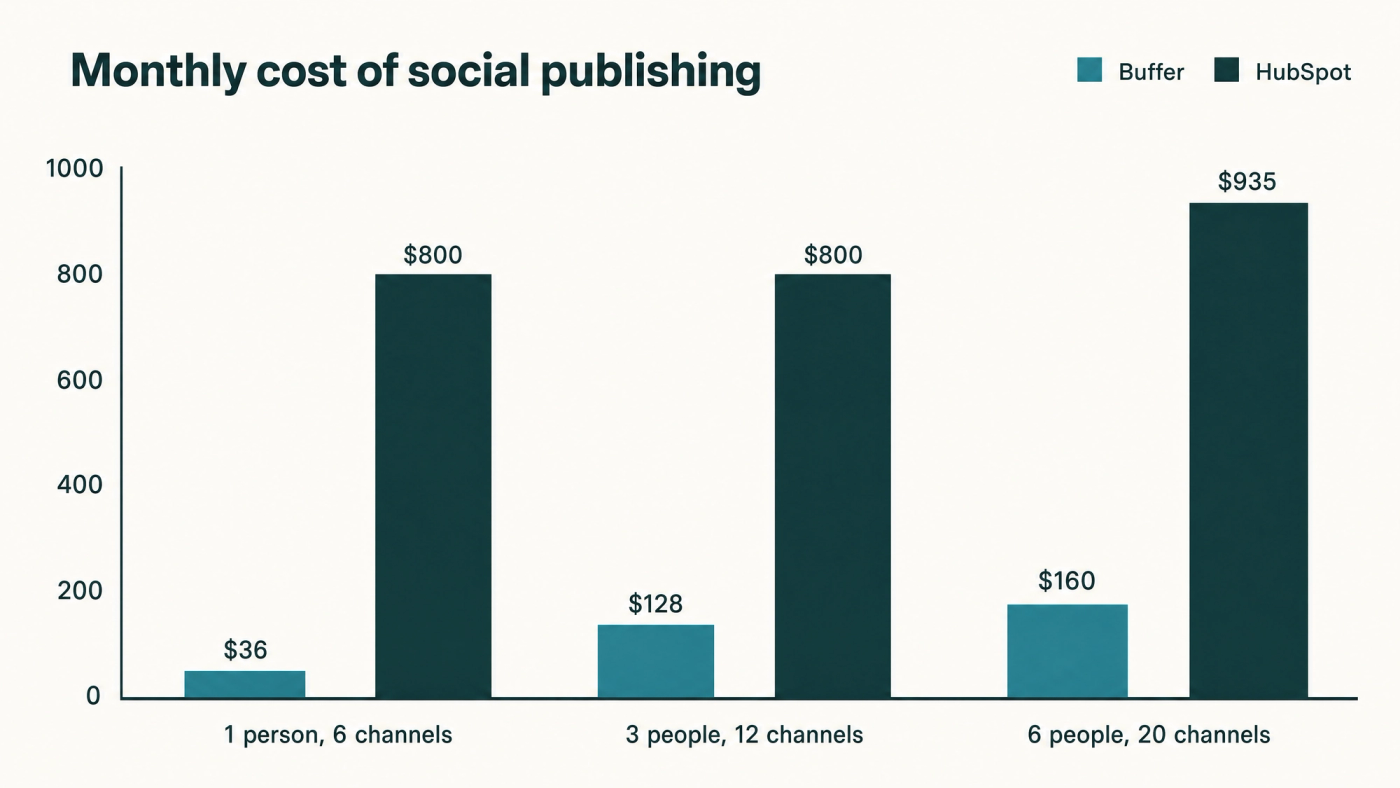
Adding channels barely touches HubSpot, which allows up to 50 connected accounts, while adding people does. Buffer's Team plan runs the other way, with free people and a channel meter, which suits an employee-generated content programme. Other tools are priced the same way in nine schedulers at three footprints.
Channels, seats and limits: where each tool runs out
Buffer connects to more networks, and HubSpot allows more accounts than a small business is likely to use. HubSpot publishes to Facebook, Instagram, LinkedIn, X, TikTok, YouTube and Reddit. Buffer covers the same networks except Reddit (YouTube as Shorts), and adds Threads, Bluesky, Pinterest, Mastodon and Google Business Profiles.
- HubSpot Professional: up to 50 connected accounts, 10,000 posts a month and scheduling up to three years ahead, with three Core Seats included.
- Buffer Free: 3 channels, 1 user, 10 scheduled posts per channel at any one time and 30 days of analytics history.
- Buffer Essentials: unlimited scheduled posts under a fair-use cap of 5,000 per channel, full analytics history and one user.
- Buffer Team: everything in Essentials plus unlimited team members, access levels, approval workflows and branded reports.
If Threads or Pinterest is part of your week, HubSpot cannot publish there, and if Reddit is, Buffer cannot. For everyone else, attribution decides it.
CRM and attribution: what HubSpot's price buys
HubSpot's advantage over Buffer is contact-level attribution. Posts sent through its social tool carry HubSpot's own tracking parameters automatically (custom tracking URLs are not allowed there). In the social inbox, a teammate assigns a social profile to a contact, and that person's interactions are then logged to their activity timeline with timestamps and message content.
Check one limit before you pay for it. HubSpot's documentation says only four interaction types appear on the contact timeline: Instagram comments, Facebook comments, X retweets and X quote tweets. LinkedIn comments can still feed a lead score (HubSpot's own example scores contacts who commented on your LinkedIn posts in the last 30 days), but they do not show on the timeline. A B2B team selling mainly through LinkedIn gets less of this feature than the headline suggests.
Buffer has no HubSpot app; its integrations list names Zapier, Make and n8n. Attribution travels on the links instead, through UTM parameters, the short labels at the end of a link that tell analytics software where a click came from, and Buffer's defaults carry a catch:
Buffer default:  ?utm_source=linkedin.com&utm_medium=social&utm_campaign=buffer
HubSpot-ready:   ?utm_source=linkedin&utm_medium=social&utm_campaign=q4-webinar
HubSpot's first traffic rule counts a visit as Organic social when utm_medium is social and utm_source is exactly the name of a recognised network, or when the referring domain is a social site. The value linkedin.com is not the exact name, so Buffer's default depends on the referrer surviving the click; when an app drops it, the visit falls through to Other campaigns.
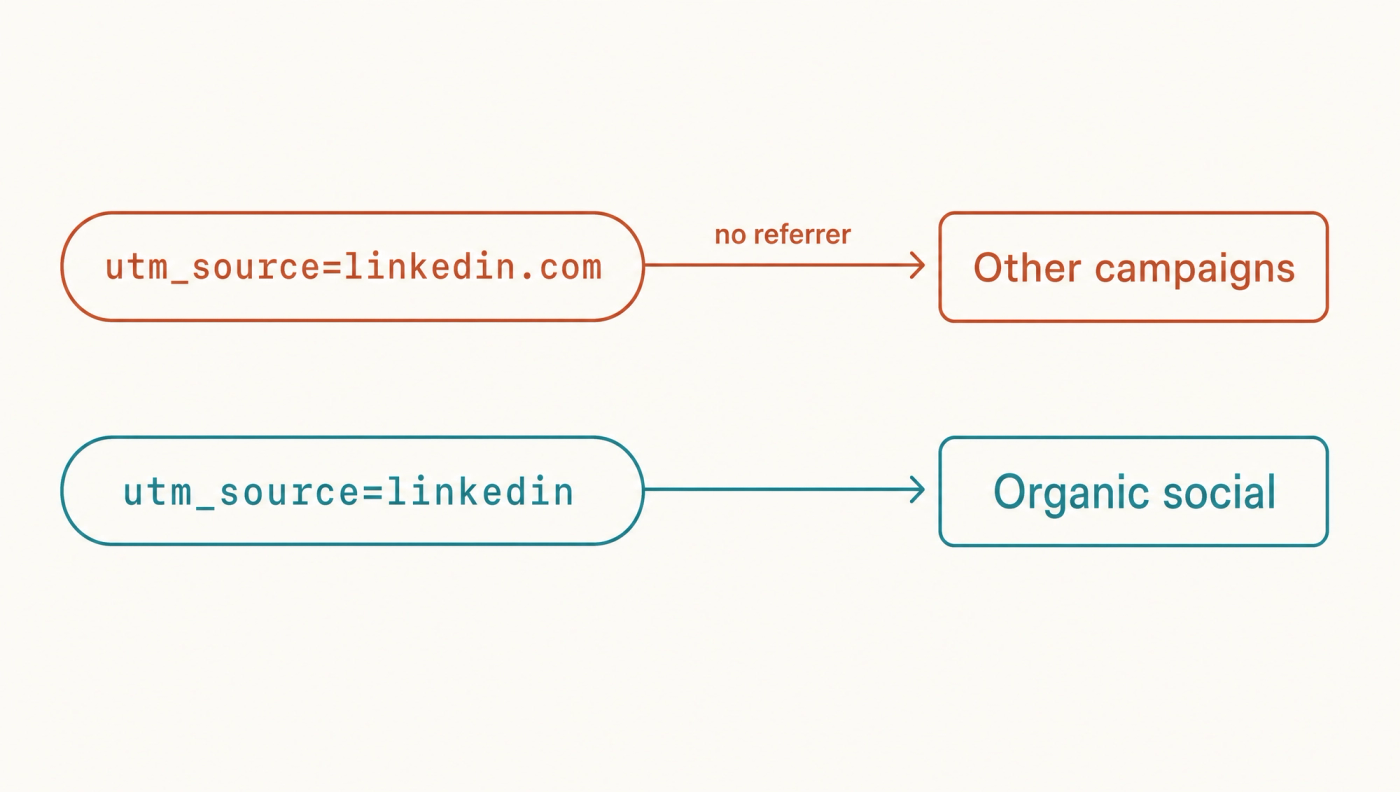
On Essentials or Team, set Buffer's custom campaign source to the bare network name: linkedin, facebook, x. On the Free plan, where the parameters cannot be customised, tag links yourself before pasting them and check the published link carries your tags. The full convention, including a test-contact check, is in how to keep HubSpot attribution when you schedule elsewhere.
Voholabs Studio: a third option on the same axes
Voholabs Studio, which is ours, is a free hosted scheduler: it undercuts both tools at every size in this comparison and matches neither on reporting. Scored on the same axes as the other two:
- Pricing: $0 at all three team sizes above, with no charge per channel or per seat.
- Channels: unlimited, across LinkedIn profiles and pages, X, Instagram, Facebook, Threads and TikTok. YouTube, Pinterest, Bluesky, Reddit and Google Business Profiles are not available.
- Seats: team members are included on the free plan.
- CRM and attribution: no CRM and no social inbox. Links tagged with utm_medium=social and the bare network name as utm_source are recorded by HubSpot as Organic social on the contact's Original Traffic Source, on every HubSpot plan.
- Limits: 2 GB of media storage, and support is limited because the service is community hosted. AI writing, image and video generation are paid.
Studio competes with Buffer on publishing, and with HubSpot only for a business paying $800 a month to schedule posts; it has no CRM and nothing like HubSpot's contact timeline. Beside HubSpot Free or Starter, with the tags fixed, it covers scheduling and click attribution for $0.
If you are AI-enabled, meaning an assistant writes your posts but you carry them between tools and never feed the results back, the AI-first step is an assistant that reads which campaigns produced contacts in HubSpot and weights next week's drafts towards them. Studio's MCP connection (Model Context Protocol, the standard that lets an AI assistant operate an outside tool) covers the scheduling half with no code, one of the AI workflows one person can run.
Keep HubSpot for contacts and schedule every channel for nothing: start free at voholabs.com/studio.
HubSpot vs Buffer verdict: who each one suits
Choose HubSpot when social activity has to sit on the contact record, and Buffer when you need publishing and post analytics at a per-channel price. HubSpot fits a team already paying for Professional for its automation, where the social tool costs nothing extra, and a sales team working leads from Instagram, Facebook or X comments. Test the LinkedIn gap first if LinkedIn is your main channel.
Buffer suits a solo operator on up to three channels, who pays nothing, and a team posting to Threads, Bluesky or Pinterest that wants branded reports. It also sits well beside HubSpot Free or Starter once the source tag is fixed. When channels or people outgrow that budget, a free scheduler takes its place in the pairing, much as the per-seat case plays out in our look at Hootsuite's free alternatives.
What to do next
HubSpot sells social activity on the contact record; Buffer sells publishing and analytics per channel. So who on your team needs to see a comment next to a deal? Write the names down. If that list has any, Professional earns its $800; if it is empty, Buffer or Studio sends the same posts for a fraction, and a correct utm_source keeps HubSpot's attribution intact.
When writing the posts becomes the bottleneck, Apex, our content agent, does that job on top of Studio. Fix your utm_source first.
References
- Marketing Hub pricing, HubSpot (2026)
- Create and publish social posts, HubSpot Knowledge Base (2026)
- Associate contacts with social interactions, HubSpot Knowledge Base (2026)
- Understand HubSpot's traffic sources in the traffic analytics tool, HubSpot Knowledge Base (2026)
- Understand Original and Latest traffic source properties, HubSpot Knowledge Base (2026)
- Manage seats, HubSpot Knowledge Base (2026)
- Buffer pricing, Buffer (2026)
- Buffer pricing in plain text, with volume pricing and supported channels, Buffer (2026)
- Understanding UTM parameters and Google Analytics, Buffer Help Center (2026)
Frequently asked questions
- Is HubSpot or Buffer better for social media scheduling?Buffer is better for scheduling alone: it starts free for three channels and costs $36 to $160 a month at the team sizes we priced. HubSpot is better when social activity must sit on the contact record, which starts with Marketing Hub Professional at a displayed $800 a month plus a $3,000 onboarding fee.
- How much does Buffer cost per month?Buffer's Free plan costs nothing for three channels and one user. Essentials is $6 per channel a month for one user, and Team is $12 per channel for channels one to ten and $4 from the eleventh, with unlimited team members. Six channels on Essentials come to $36 a month, and 20 channels on Team to $160.
- Does Buffer integrate with HubSpot?Buffer's integrations list has no HubSpot app; it names Zapier, Make and n8n. The practical link is UTM tracking: set utm_medium to social and utm_source to the bare network name, such as linkedin, and HubSpot records the visit as Organic social on the contact's Original Traffic Source.
- Do LinkedIn comments show up on HubSpot contact records?Not on the activity timeline. HubSpot's documentation lists Instagram comments, Facebook comments, X retweets and X quote tweets as the interaction types that appear there. LinkedIn comments can still be used in HubSpot lead scores, for example to score contacts who commented on your LinkedIn posts in the last 30 days.
Sources
- Marketing Hub pricing· HubSpot
- Create and publish social posts· HubSpot Knowledge Base
- Associate contacts with social interactions· HubSpot Knowledge Base
- Understand HubSpot's traffic sources in the traffic analytics tool· HubSpot Knowledge Base
- Understand Original and Latest traffic source properties· HubSpot Knowledge Base
- Manage seats· HubSpot Knowledge Base
- Buffer pricing· Buffer
- Buffer pricing in plain text, with volume pricing and supported channels· Buffer
- Understanding UTM parameters and Google Analytics· Buffer Help Center