AI Content Skills: How to Humanize AI Writing (5 Fixes)
Part 1 of the AI content skills series: five real fixes that make AI writing sound human, each shown before and after, and a Claude skill that checks them.

This is article one in our AI content skills series. AI writing sounds like AI for five reasons: lyrical fragments, an em dash in every paragraph, headlines that say nothing, a generic expert voice, and hype words. Fix those five and it reads like a person wrote it.
Below are five review notes we gave our own AI, each with the line it wrote, the note we sent back, and the line that replaced it. At the end there is a Claude skill that runs all five checks before you read a draft.
What this series is
We run most of our content through AI agents, then we review every draft before it goes out. This AI content skills series collects the corrections that keep repeating, the small notes that turn a competent draft into something we would actually publish. Nothing here is theoretical. Every example below is a real note from an actual review, masked where it needs to be. Each article ends with a SKILL.md file you can install so an agent applies the fix itself, next time, without you typing the same note again. We have already written up the wider idea of saved instructions in 166 Ready-Made Skills That Turn Any AI Into a Specialist. This series is seven of those skills, built in public.
The 5 mistakes
1. Poetic lines
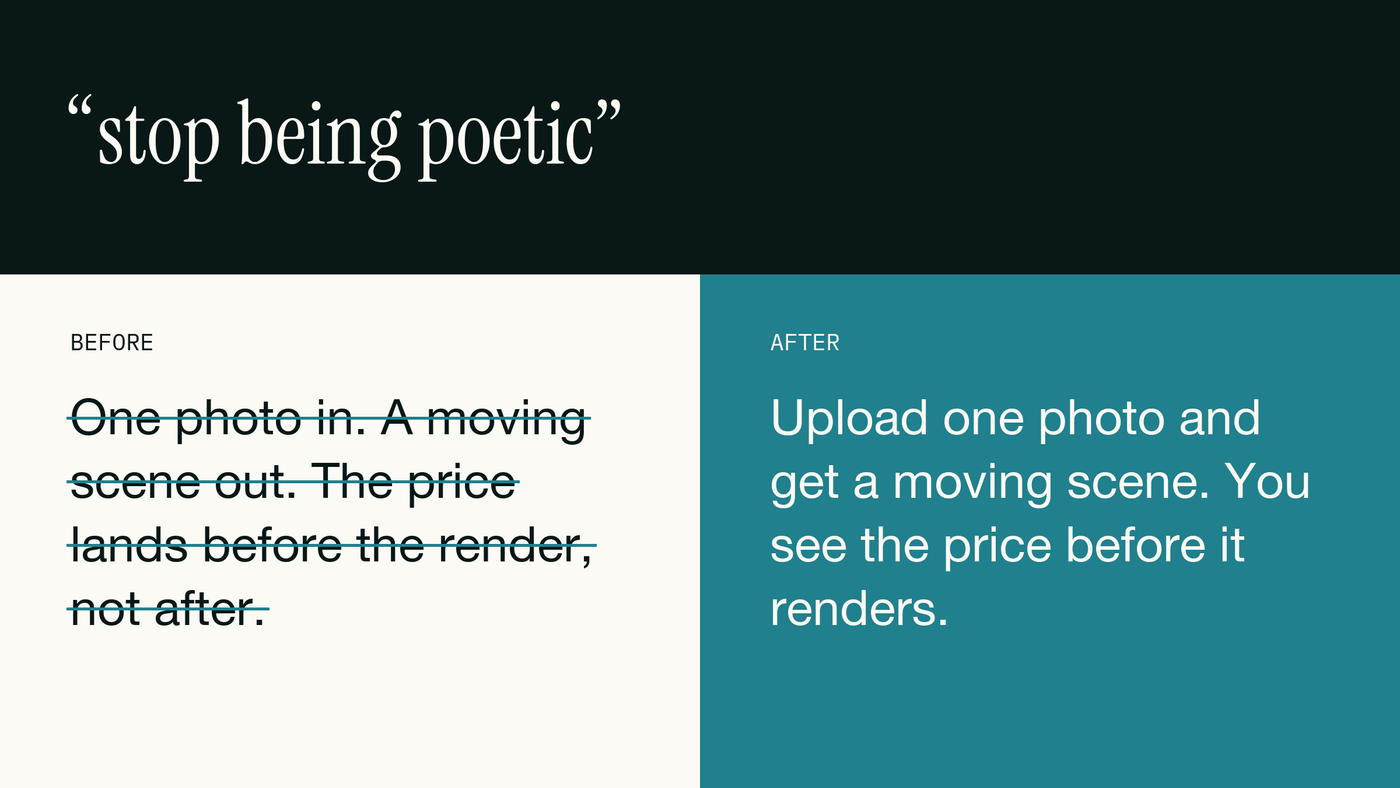
A fragment chain reads like a movie trailer, not like a person explaining a product. Plain beats lyrical every time you want someone to actually understand you. A sentence needs a subject and a verb; if a line would work as trailer voiceover, that is the sign to rewrite it as one plain sentence. Read it out loud; if it sounds like a voiceover, it is not ready.
2. Em dashes everywhere
An em dash usually marks the spot where the model glued two thoughts together instead of finishing the first one. A full stop does the same job and reads like a person talking. Once you start looking, the pattern is easy to spot and easy to fix: search the draft for the character and replace every one.
3. Headlines that say nothing
A headline has one job: say who did what. "An audit revised" does not tell you who revised it or what happened next; it gestures at an event instead of reporting one. Put the actor and the action in the first four words and the rest of the sentence has somewhere to go. Readers skim headlines first. A vague one costs you the click before the article starts.
4. Polished generic authority
Generic authority writing reads confident and says nothing you could not have guessed. The fix is not more polish, it is the owner's actual voice: blunt, an opinion, a direct question to the reader, lowercase if that is how they would type it into a group chat.
5. Hype words
Hype words describe the announcement, not the thing. "Just dropped" could mean anything shipped anywhere; it carries no information. Say what the product now does and let the reader decide if that is exciting. The original example named a client's tool, so here is a fresh one using our own product instead:
The Claude skill
The skill below lives at a fixed path in your Claude Code setup. Claude Code loads it automatically and runs it before any post, article, caption or headline goes out.
mkdir -p ~/.claude/skills/humanize-copy
# paste the SKILL.md below into ~/.claude/skills/humanize-copy/SKILL.md
# then in Claude Code: /humanize-copy  (or just ask it to draft; the description triggers it)
---
name: humanize-copy
description: Use before returning any public-facing copy (posts, articles, captions, site copy, headlines, email). Rewrites and checks a draft so it reads like the owner wrote it, not like an AI. Triggers on write, draft, rewrite, edit, caption, headline, copy.
---
# humanize-copy
Apply these five rules to every draft, then run the self-check. Return only the corrected copy.
## Rules
1. Plain beats lyrical. No fragment chains for effect ("One photo in. A moving scene out."). Every sentence has a subject and a verb. If a line would work as a movie trailer, rewrite it as one plain sentence.
2. Zero em dashes. Replace each one with a full stop, a comma or "and". Also remove spaced hyphens used as dashes.
3. Headlines say what happened: who did what. Nouns and a verb, no abstraction. "Team X published the audit", not "An audit revised".
4. Write in the owner's voice. Read their last five posts first. Match sentence length and register: blunt, an opinion, a direct question to the reader, lowercase is fine if they use it.
5. No hype words. Banned: just dropped, unlock, seamless, game-changer, revolutionary, excited to announce, supercharge, next-level, elevate, effortless. Say what the thing now does.
## Self-check (all must pass)
- Search the draft for an em dash character and for a spaced hyphen used as a dash: zero hits.
- Read the first two sentences alone: would a stranger understand them on first read?
- Count banned words: zero.
- Every headline contains a subject and a verb.
- Would the owner say each sentence out loud in a meeting? If not, cut it or rewrite it.
Run it on the last thing you published.
Where this leaves you
Install the skill, then run it on the last thing you published and count how many em dashes it finds. That fixes the line level; the strategy level, training the AI on your own voice from the start, is a separate job we cover in Generic AI Content: Why It All Reads the Same (And the Fix). If you want the scheduling handled too, Voholabs Studio is free to start.
Frequently asked questions
- What is the AI content skills series?It is a Voholabs blog series where we show five real mistakes AI makes in content, the correction we gave in each case, and a free Claude skill, a SKILL.md file, that applies the fix automatically. This article covers wording; the rest of the series covers hooks, standalone posts, SEO and GEO, fact checking, explaining and visuals.
- How do I make AI writing sound human?Cut fragment chains and lyrical lines, remove every em dash, write headlines that say who did what, match the owner's own voice instead of a generic expert tone, and drop hype words like "just dropped". The humanize-copy Claude skill in this article checks all five before you read a draft.
- What is a Claude skill?A Claude skill is a saved SKILL.md file that tells Claude Code how to do one job the same way every time. You save it once in your skills folder and Claude runs it automatically when the task matches, instead of you re-explaining the rules in every chat.
Sources
- Equipping agents for the real world with Agent Skills· Anthropic
- Creating helpful, reliable, people-first content· Google Search Central
- Does AI content rank well in search? Semrush (2026)· Semrush